


Phyn
3.6203.00 Reviews
App Specs
- Version
- 8.25.1
- Updated On
- License
- Free
- Downloads
- 10,000+
- Developer
- Phyn LLC
- Categories
- House & Home
- Platform
- Android
Screenshots
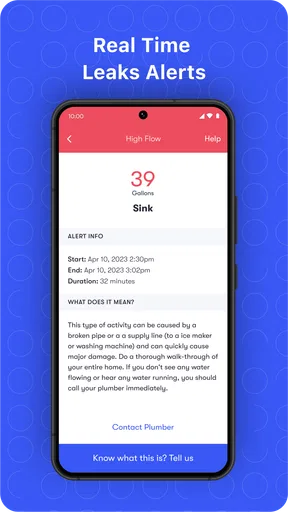
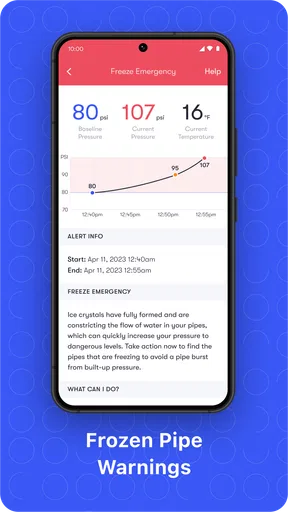
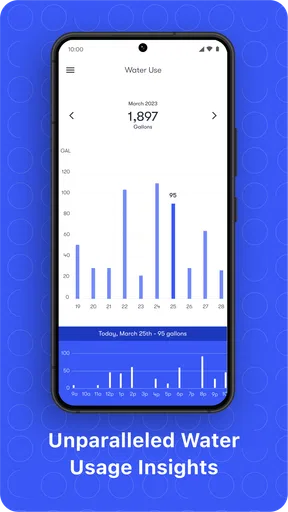
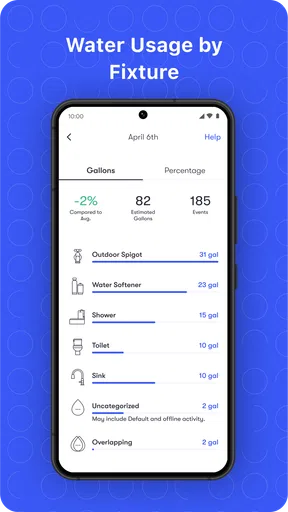
 Analysis by AppCompare
I think Phyn makes the most sense when you see it as the phone-based side of a connected water-monitoring setup, rather than as a plumbing fix on its own. The app is free, comes from Phyn LLC, and sits in the House & Home category. Its purpose is practical: help you keep an eye on household water activity and respond when something seems wrong. That can be reassuring, but it also means the experience depends on the wider setup and on being able to reach the information when you need it.
When a connection changes the experience
Water problems are often quiet. A tap left running, a toilet that keeps refilling, or a leak behind an appliance can waste water without making enough noise to catch your attention. The useful promise here is being able to check activity and receive alerts through the app, instead of relying only on occasional visual checks around the house. That is a meaningful difference from a basic water-saving reminder or a manual inspection routine.
Connectivity matters most when you are away. If an alert arrives while you are at work or out for the day, being able to review the app can help you decide whether to call someone, ask a person with access to check, or wait until you get home. I would treat that as an early-warning aid, not proof that every plumbing issue will be found or diagnosed. A notification can point you toward unusual activity; you still need to judge what to do next.
It is also worth thinking about the moments when you expect the app to be most useful. If your home internet or phone connection is unreliable, remote checking may be less dependable as a routine. I would not build an emergency plan around a notification arriving instantly every time. Keep the ordinary safeguards too: know where the water shutoff is, and make sure the people who may be in the house know how to reach it.
Using it around a real household routine
A realistic use case is leaving for a weekend and wondering whether everything is fine at home. Rather than guessing, you can check for water activity from your phone and pay attention to an alert that looks out of the ordinary. The benefit is not that the app removes all risk; it gives you another way to notice a possible problem while you are away. That extra context can make a call to a neighbor or plumber more informed.
At home, I would use the information as a way to investigate patterns, not as a scorecard for every person in the household. If usage looks unusual after laundry or a long shower, context matters. A useful habit is to compare what you see with what was happening in the home at the time, then look for repeated activity that has no obvious explanation. This is more helpful than reacting to one data point without checking the circumstances.
The app may suit owners who want a connected layer of oversight, especially if they travel, manage a second home, or have appliances and plumbing they cannot easily inspect throughout the day. Renters or people who cannot arrange the relevant home equipment may find less value in it. Before relying on the app, make sure the physical setup is appropriate for your home and that you are comfortable maintaining a connected household device.
Worth Reading Before You Choose

Flipboard Shows What News Apps Must Do Beyond the Feed

Switching to Android Auto Means Rethinking Your Driving Routine

Google Calendar Makes a Crowded Week Easier to Manage

Ludo King Makes the Most of the Minutes Between Plans

Baby Panda World Brings Quick Play to Modern Phones, but Its Game Library Feels Busy

ESPN’s Live Game View Makes Following Close Games Easier
What to expect when something goes wrong
Alerts can shorten the time between a water issue starting and someone noticing it, but they do not replace diagnosis. A warning about unusual activity is a reason to investigate, not a guarantee that the app can identify the exact pipe, fitting, or appliance at fault. If you receive one, check the household’s recent water use first, then contact a qualified professional if the cause is not clear or the problem appears serious.
There is a practical recovery question too: what if you do not see a notification? I would not assume that a quiet phone means the plumbing is certainly fine. Keep notifications enabled if you want timely prompts, and occasionally open the app to confirm that the information you expect is available. If the app or connection is not behaving as expected, checking the phone’s network and the home’s connected setup is a sensible first step before treating it as a plumbing failure.
This is where connected monitoring differs from a conventional leak alarm. A simple local alarm can be valuable because it makes noise near the problem, while a connected app is more useful for remote awareness and reviewing activity. Neither approach covers every situation. For a home where someone is always present, a local alert may be enough; for a home that is often empty, remote visibility can be a stronger reason to consider a connected system. Some households will prefer both layers rather than choosing one.
Making the information useful without overchecking
Water-use information is most useful when it answers a specific question. If you are trying to understand whether a new routine changed consumption, check at consistent times and compare days with similar household activity. Avoid drawing conclusions from a single busy day, when guests, cleaning, or laundry may explain a jump. That small bit of discipline can help turn a stream of readings into a practical observation.
There is a trade-off between staying informed and constantly watching an app. I would set a routine that fits your concern level, then let alerts do the work of drawing attention to something unusual. If you check every small fluctuation, ordinary household activity can become noise and the important warning may feel less distinct. A calm, occasional review is more sustainable than treating water monitoring as another screen that needs constant attention.
People who are especially careful about household data may also want to review the app’s current privacy and notification settings before making it part of their routine. Keep the information limited to the people who need it, and decide who should respond if an alert arrives when you are unavailable. That is a simple household workflow, but it avoids the awkward situation where everyone assumes someone else is handling a possible leak.
Who benefits, and who may prefer another approach
I can see this being a good fit for homeowners who want a clearer view of water use and value remote alerts. It is also potentially useful for someone who has had a plumbing surprise before and wants another way to notice unusual activity. The strongest case is a home where the occupants will actually use the information: checking a warning, investigating a pattern, and knowing what action to take.
It is less compelling if you only want a basic reminder to conserve water, have no way to use the connected hardware, or would rather rely on occasional manual checks. A simple leak sensor may be a better choice if your concern is one specific appliance or location and you do not need broader water-use context. Conversely, a plumber’s inspection is the better answer for diagnosing a persistent issue; an app cannot replace hands-on expertise.
The product’s audience appears established but not enormous: it has over ten thousand installs and an average rating of 3.8 from around 683 ratings. I take that as a reason to approach it with sensible expectations rather than assume every home will have the same experience. Its Everyone age rating makes it broadly suitable from an age-classification perspective, but the real decision is whether the connected setup fits your home and habits.
Everyday use, setup, and overall fit
Have you ever had one of those days where everything's going great, and then—bam!—you discover a leak at home? Well, enter Phyn, a smart app designed to save your day by monitoring water usage and detecting leaks before they become a nightmare.
Getting Started with Phyn
Setting up Phyn is as simple as pie. Once you’ve downloaded it from the app store, just follow the straightforward installation guide. The app pairs seamlessly with the Phyn Plus device, and before you know it, you’re all set to monitor your home’s water usage right from your phone. No rocket science degree required!
Design and User Interface
The first thing you'll notice is its sleek and intuitive design. It’s like the app is saying, "Hey, I’m here to make your life easier!" Navigating through the app is a breeze, thanks to its well-organized layout. You’ve got your water usage data, alerts, and settings all neatly tucked away but easily accessible. No more fumbling around trying to find what you need.
Features That Stand Out
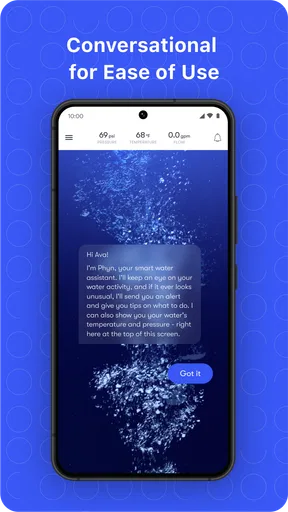
One of the coolest features of the app is its ability to provide real-time water usage data. Imagine being able to see how much water your household is using at any given moment. It's like having a personal water detective!
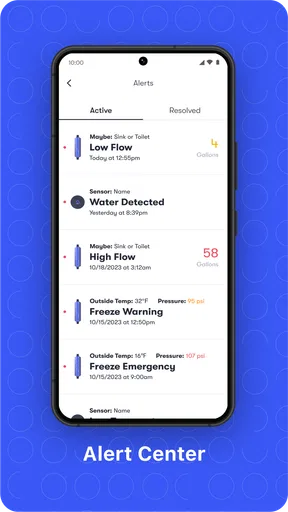
And let’s talk about leak detection. The app not only alerts you when there’s a potential leak but also provides insights into where it might be occurring. It’s like having a plumber in your pocket, minus the hefty call-out fee.
Plus, the app has this nifty feature that allows you to set water usage goals. So if you’re trying to be more eco-friendly or just save on your water bill, Phyn’s got your back.
Performance in Daily Use
Now, let’s get into the nitty-gritty of how the app performs in real life. The app updates in real-time, which means you’re getting the freshest data right when you need it. The alerts are timely and accurate, so you’re never caught off guard by unexpected water issues.
One of my favorite experiences was receiving a notification about unusual water activity while I was away. I could quickly check the app, identify the issue, and resolve it without having to rush home. Talk about peace of mind!
Who Will Love This App?
If you’re a homeowner who’s passionate about conserving water or someone who simply wants to avoid the hassle of unexpected plumbing issues, this app is a game-changer. It’s perfect for tech-savvy individuals as well as those who might not be as familiar with smart home technology, thanks to its user-friendly design.
In conclusion, Phyn is a must-have for anyone looking to take control of their home’s water usage. With its intuitive interface, powerful features, and real-time updates, it's like having a water-savvy friend keeping an eye on things for you. So why not give it a go? Your future self might just thank you for it!
Version, access, and final considerations
The current version is 8.22.2, and the app is free to download. It was released on March 31, 2018, and requires iOS 12 or later. Those details help with the basic compatibility decision, but I would still check that your particular phone and connected home arrangement work smoothly before depending on it for alerts.
For me, the main question is not whether a water app sounds useful; it is whether you will act on the information it gives you. Set a sensible notification routine, know who can respond at home, and treat unusual activity as a prompt to investigate. If those habits fit your household, the connected approach can add useful awareness. If you want a stand-alone alarm, a professional diagnosis, or a system that does not depend on connectivity, another option may suit you better.
Pros
- Intuitive user interface for easy navigation.
- Real-time alerts for water usage anomalies.
- Customizable notifications and usage reports.
- Integration with smart home devices.
- Helps in conserving water and reducing bills.
Cons
- Requires stable internet connection for alerts.
- Setup process can be a bit complex.
- Limited compatibility with older devices.
- Subscription needed for advanced features.
- Occasional delays in data updates.
FAQs for Phyn
What is Phyn and how does it work?
Phyn is a smart water assistant that helps you monitor and manage your household water usage. It uses advanced sensors to track water flow, detecting leaks and abnormalities in real-time. The app provides detailed insights and alerts, allowing users to conserve water, reduce bills, and prevent water damage.
Is Phyn compatible with all plumbing systems?
Phyn is designed to be compatible with most standard plumbing systems. However, it’s essential to check the specific requirements and compatibility information on the Phyn website or consult a professional plumber. Some older systems may require additional adjustments or components for optimal installation.
Does Phyn require a subscription for full functionality?
Phyn does not require a subscription to access its basic features, such as monitoring water usage and leak detection. However, additional premium features or enhanced analytics might be available through optional subscription plans. It's best to review the app’s pricing details for comprehensive information.
How reliable is Phyn in detecting leaks?
Phyn is highly reliable in detecting leaks, utilizing sophisticated algorithms to identify changes in water flow patterns. It can distinguish between normal usage and potential leaks, providing alerts for both small drips and significant issues. Users report a high level of accuracy, which helps in taking timely action.
What are the installation requirements for Phyn?
Installing Phyn typically requires a Wi-Fi connection, a nearby power outlet, and access to your home’s main water line. The installation process can be DIY for those comfortable with plumbing tasks, but professional installation is recommended to ensure proper setup and optimal performance.


